Westwind
Westwind turns an edge AI pipeline into Zephyr RTOS firmware. A pipeline is one westwind.yaml file: the training data, the model, the board, where inference runs, and the on-device graph that takes camera, audio or sensor data through preprocessing, ExecuTorch inference and postprocessing to a result your code acts on.
Data comes from Hugging Face, Kaggle or Edge Impulse. Models come from MediaPipe, from a PyTorch training recipe, from Edge Impulse or from Hugging Face, and are converted to ExecuTorch programs. The same file drives the westwind command line tool, the VS Code extension and this site.
Projects are kept in your browser, and editing and validation work without an account. Building firmware from this site needs a GitHub or Google sign-in.
From data to firmware
westwind run goes from fetch to build and westwind flash does the last step. Each stage also runs on its own.
fetch- Downloads the data entries: Hugging Face datasets, Kaggle datasets, Edge Impulse projects, URLs or local paths. Credentials come from environment variables named in the file, never from the file itself.
train- Runs a builtin recipe or your train.py (build_model() and train() in PyTorch). With a federated section, Flower trains across edge hosts and only the weights leave each site.
convert- Turns a MediaPipe TFLite model or a PyTorch model into an ExecuTorch program (.pte), in float or int8, and checks its outputs against the original.
generate- Writes a Zephyr application from the graph: mpipe elements from Zephyr and the westwind-zephyr module, prj.conf, and your C or C++ code.
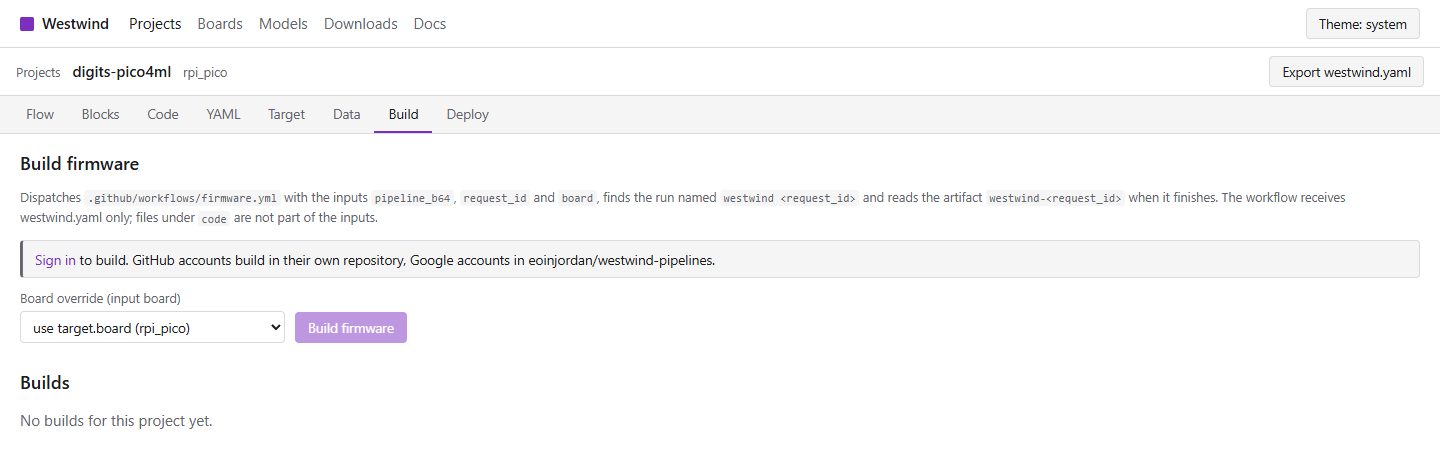
build- Runs west build for the board, in GitHub Actions from this site, on your machine, in Docker Compose or as a Kubernetes Job.
flash- Writes the image from the browser over Web Serial for ESP32 boards, as a .uf2 file for the RP2040, or with westwind flash for the other methods.
Running on real hardware
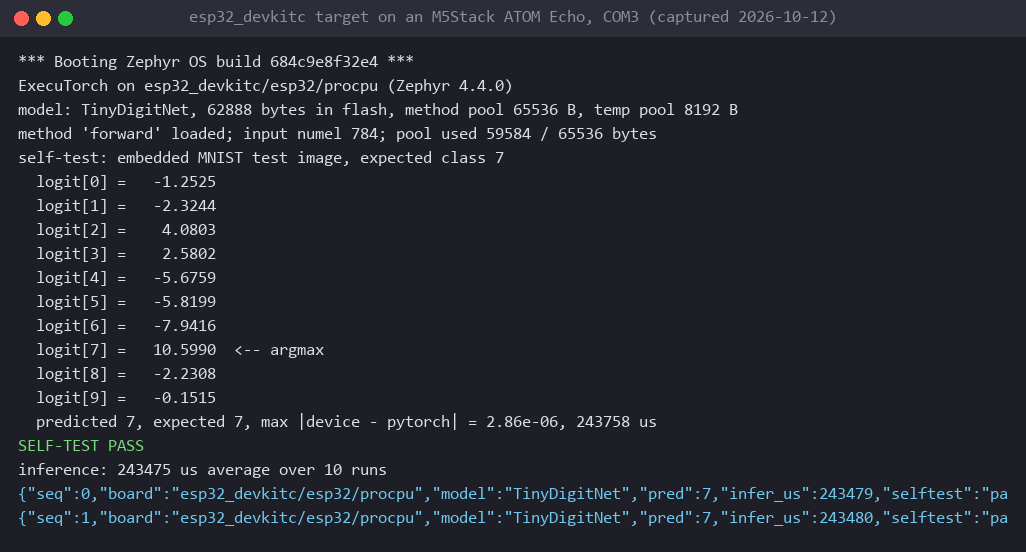
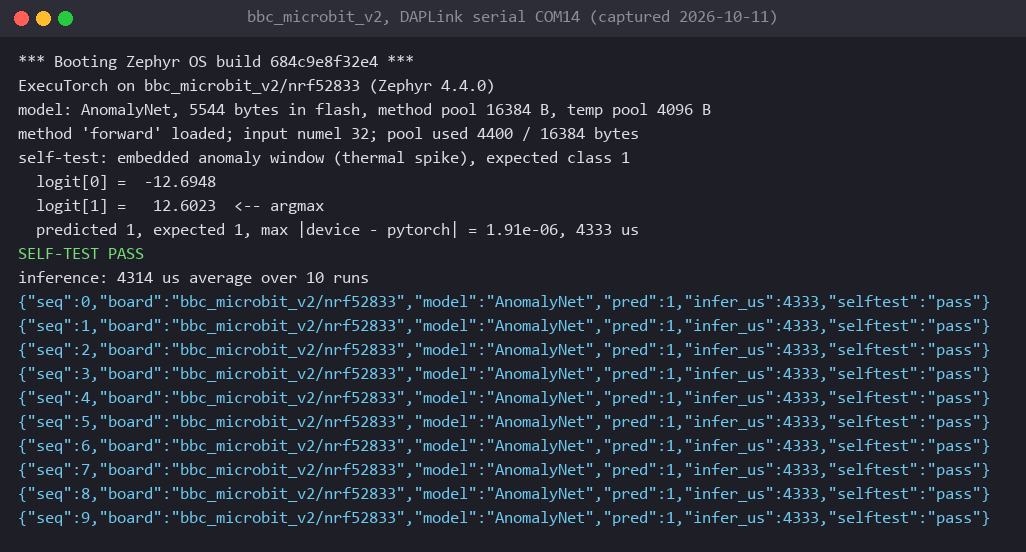
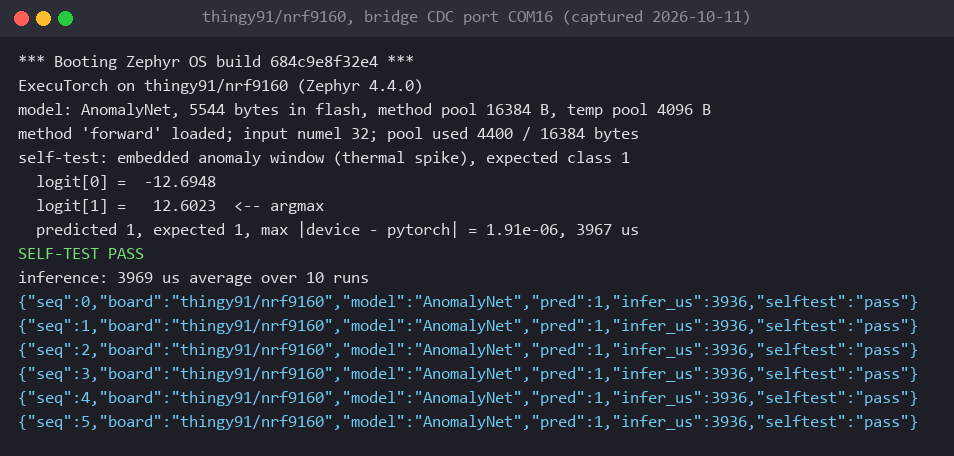
These are photos, console captures and logs from boards on my bench, with the numbers they printed. Each run starts with a self-test that compares the board's output on an embedded input with PyTorch's, then times the inference. The code for each board is in its repository, linked below.
Arduino UNO Q
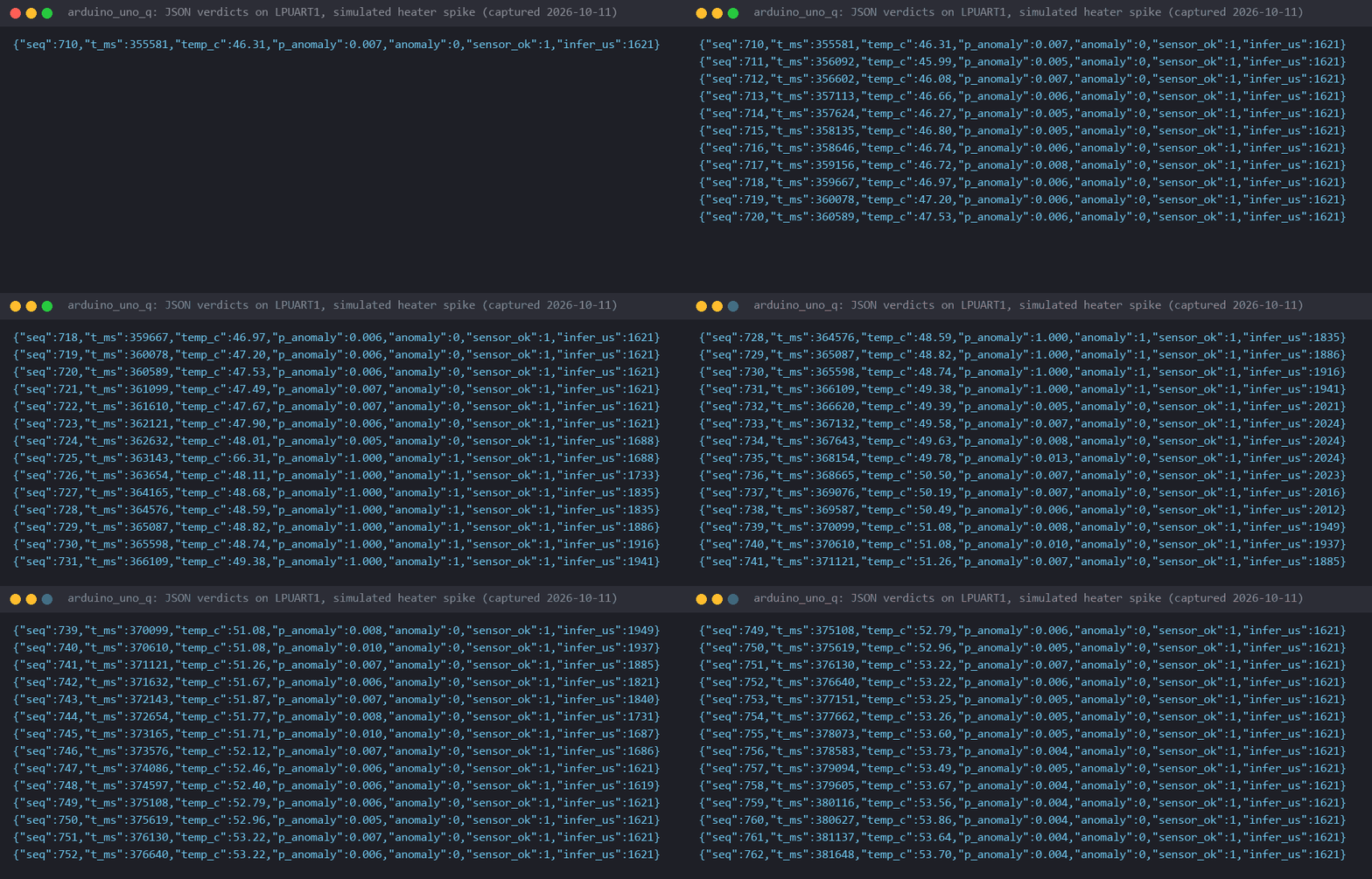
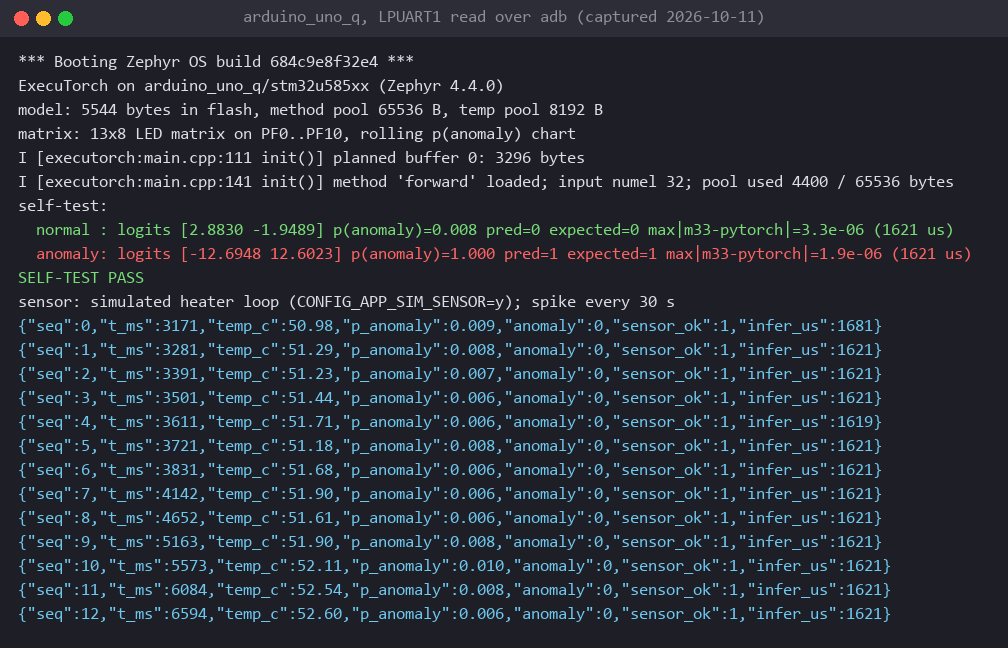
AnomalyNet on the STM32U585 (Cortex-M33), 5544 bytes of model in flash. The self-test matches PyTorch to 3.3e-06 and one inference takes 1621 us; verdicts go to the Linux side as JSON lines. executorch-zephyr-arduino-uno-q
Arducam Pico4ML-BLE
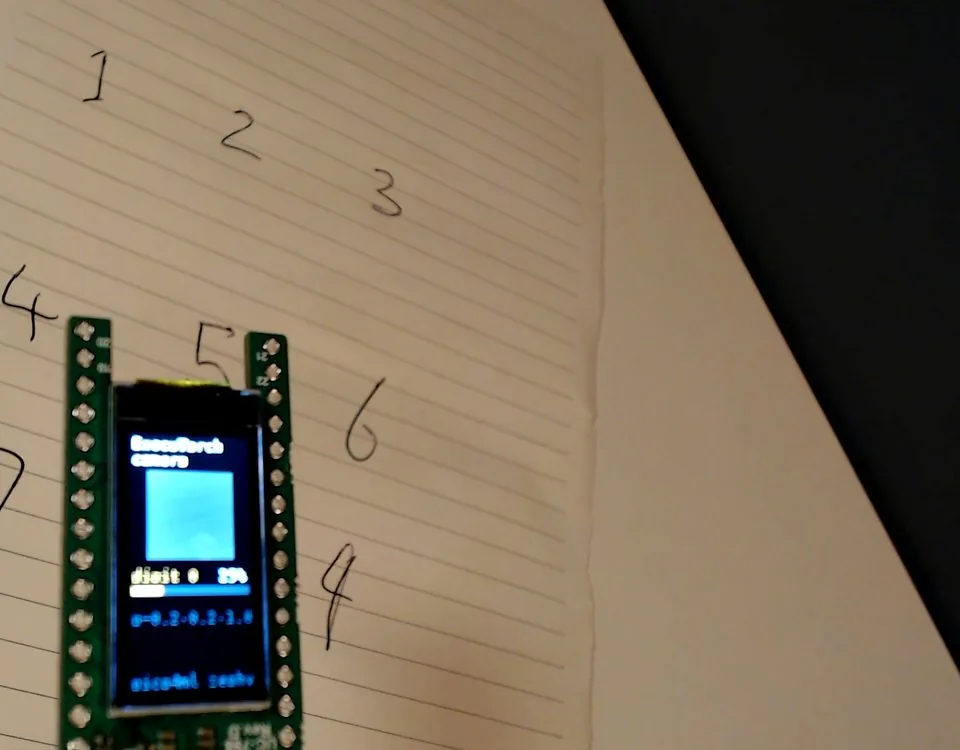
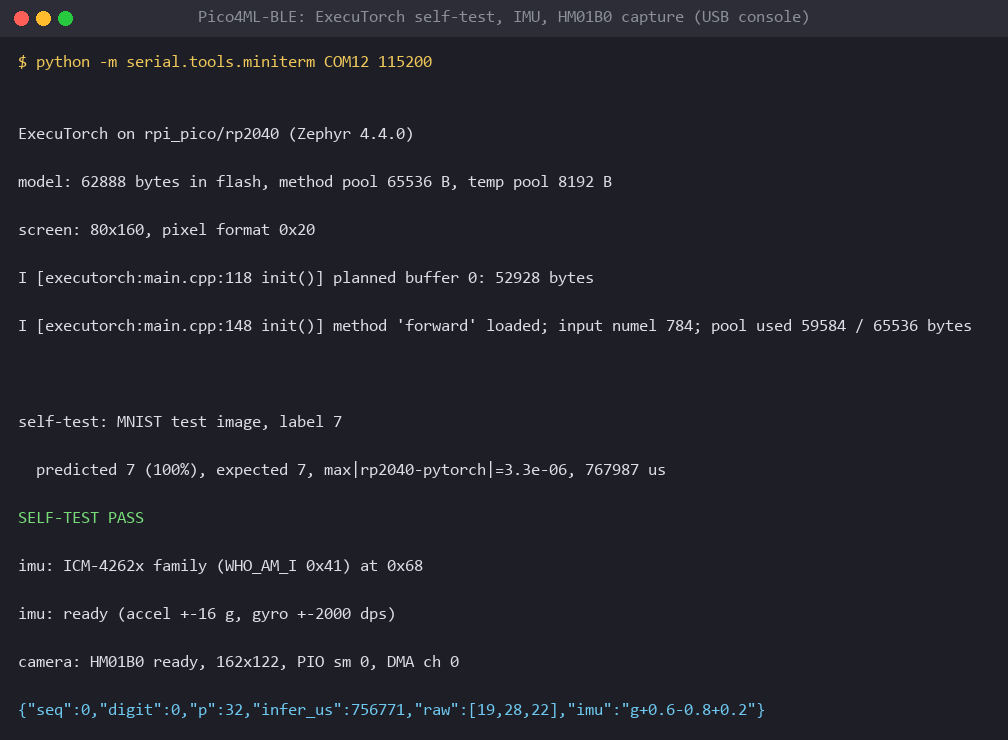
TinyDigitNet on the RP2040 (Cortex-M0+ at 133 MHz, no FPU), reading hand-written digits with the HM01B0 camera. The self-test predicts 7 at 100 %, matches PyTorch to 3.3e-06 and takes 767987 us. executorch-zephyr-arducam-pico4ML-BLE
ESP32-DevKitC
TinyDigitNet on the ESP32 (Xtensa LX6), run on the esp32_devkitc target on an M5Stack ATOM Echo. It matches PyTorch to 2.86e-06 and takes 243475 us on average over 10 runs. executorch-zephyr-esp32-devkitc
BBC micro:bit v2
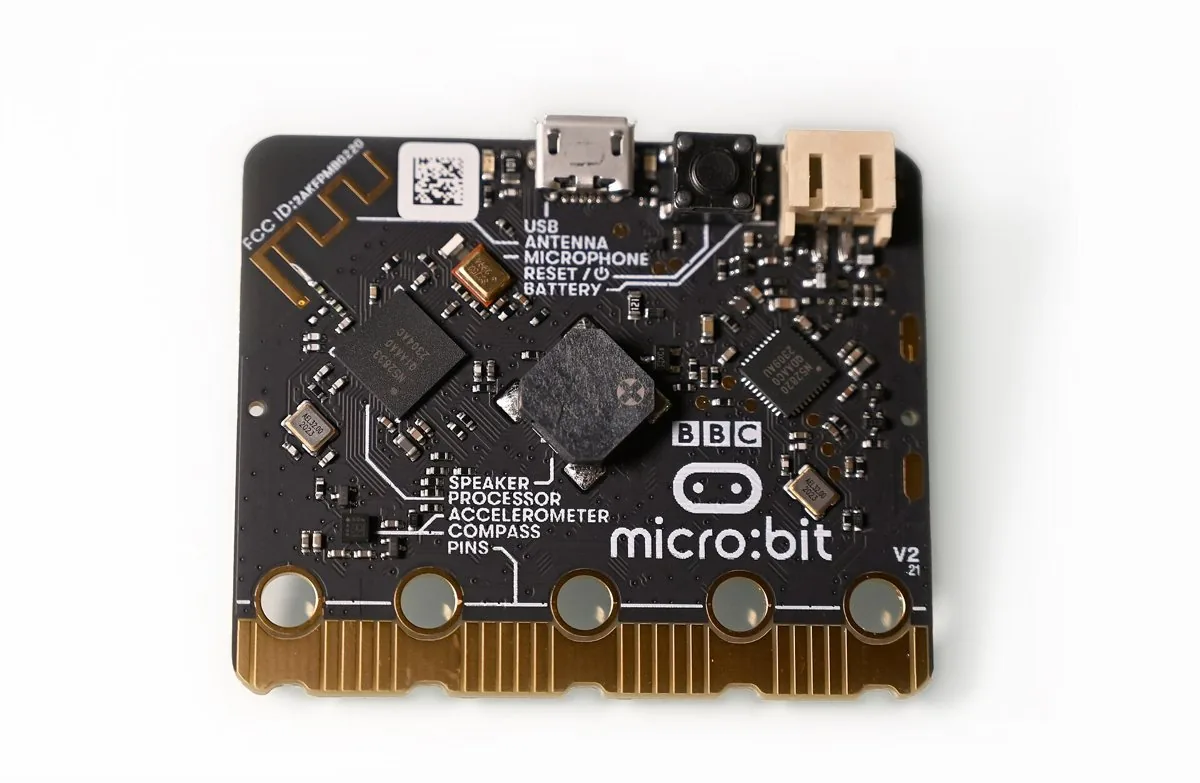
AnomalyNet on the nRF52833 (Cortex-M4F at 64 MHz). It matches PyTorch to 1.91e-06 and takes 4314 us on average over 10 runs; the build uses 178 KB of 512 KB flash and 67 KB of 128 KB RAM. executorch-zephyr-microbit-v2

Nordic Thingy:91
AnomalyNet on the nRF9160 (Cortex-M33 at 64 MHz). It matches PyTorch to 1.91e-06 and takes 3969 us on average over 10 runs. executorch-zephyr-thingy91
M5Stack ATOM Echo
Keyword spotting on the ESP32 with the on-board PDM microphone. The exported model matches PyTorch to 4e-6, one inference takes 172 ms and the 49-frame MFCC 30 ms, and the trained model scores 96.6 % on held-out clips. The decoded microphone level is still being checked. executorch-zephyr-m5stack-atom-echo
Sipeed Tang Nano 20K
A LiteX SoC with a VexRiscv RISC-V core at 48 MHz in the Gowin GW2AR-18C FPGA, with 8 MiB of SDRAM. Zephyr 4.4 boots from the LiteX BIOS over serial and ExecuTorch runs TinyDigitNet in soft float: SELF-TEST PASS, 3.34e-06 from PyTorch, 2956766 us on average over 10 runs.
--============= Liftoff! ===============--

*** Booting Zephyr OS build 684c9e8f32e4 ***

ExecuTorch on tang_nano_20k/litex_vexriscv (Zephyr 4.4.0)
model: 62888 bytes, method pool 131072 B, temp pool 16384 B
I [executorch:main.cpp:118 init()] planned buffer 0: 52928 bytes
I [executorch:main.cpp:148 init()] method 'forward' loaded; pool used 59584 / 131072 bytes
  logit[0] =   -1.2525
  logit[1] =   -2.3244
  logit[2] =    4.0803
  logit[3] =    2.5802
  logit[4] =   -5.6759
  logit[5] =   -5.8199
  logit[6] =   -7.9416
  logit[7] =   10.5990  <-- argmax
  logit[8] =   -2.2308
  logit[9] =   -0.1515
self-test: predicted 7, expected 7, max |device - pytorch| = 3.34e-06, 2956822 us
SELF-TEST PASS
inference: 2956766 us average over 10 runs at 48 MHz
Tests and training runs
The westwind-zephyr elements have unit tests that run under QEMU. Locally on mps2/an385, 7 of 7 pass:
------ TESTSUITE SUMMARY START ------

SUITE PASS - 100.00% [westwind_blazeface]: pass = 4, fail = 0, skip = 0, total = 4 duration = 0.517 seconds
 - PASS - [westwind_blazeface.test_one_face] duration = 0.117 seconds
 - PASS - [westwind_blazeface.test_overlapping_anchors_merge_by_score] duration = 0.104 seconds
 - PASS - [westwind_blazeface.test_threshold] duration = 0.192 seconds
 - PASS - [westwind_blazeface.test_two_faces_best_first] duration = 0.104 seconds

SUITE PASS - 100.00% [westwind_json]: pass = 3, fail = 0, skip = 0, total = 3 duration = 0.005 seconds
 - PASS - [westwind_json.test_classify_line] duration = 0.002 seconds
 - PASS - [westwind_json.test_detection_line] duration = 0.002 seconds
 - PASS - [westwind_json.test_short_buffer] duration = 0.001 seconds

------ TESTSUITE SUMMARY END ------

===================================================================
PROJECT EXECUTION SUCCESSFUL
In GitHub Actions, Twister ran 14 of 14 test cases on mps2/an385 and native_sim, and the classify sample built for rpi_pico at 327,912 B of flash and 187,176 B of RAM.
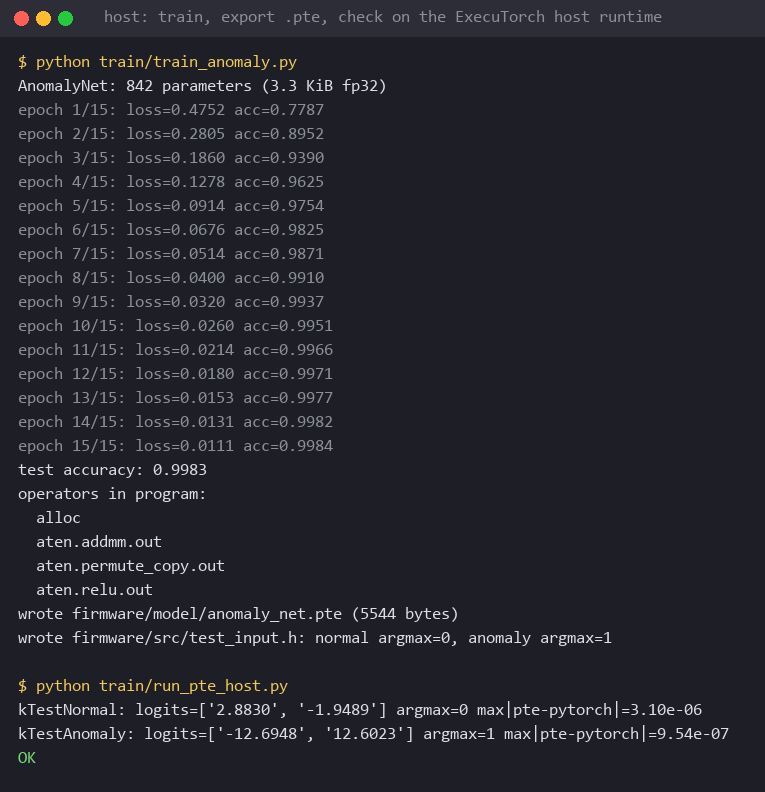
Training runs of the AnomalyNet pipeline, as each run wrote them to model/anomaly_net.json (values to six significant digits; the linked files have them in full):
| Run | Result | Program |
|---|---|---|
| westwind submit in Docker Compose, builtin recipe | accuracy 0.98075 on 8000 examples, loss 0.0713489, 4 s | 5544 bytes, max abs diff 2.38419e-7 |
| Flower profile in Docker Compose, 2 SuperNodes | eval_acc by round: 0.79275, 0.811875 | 5544 bytes, max abs diff 0 |
| westwind federate --run, 3 rounds | eval_acc by round: 0.79275, 0.811875, 0.8355 | 5544 bytes, max abs diff 5.96046e-8 |
The editor
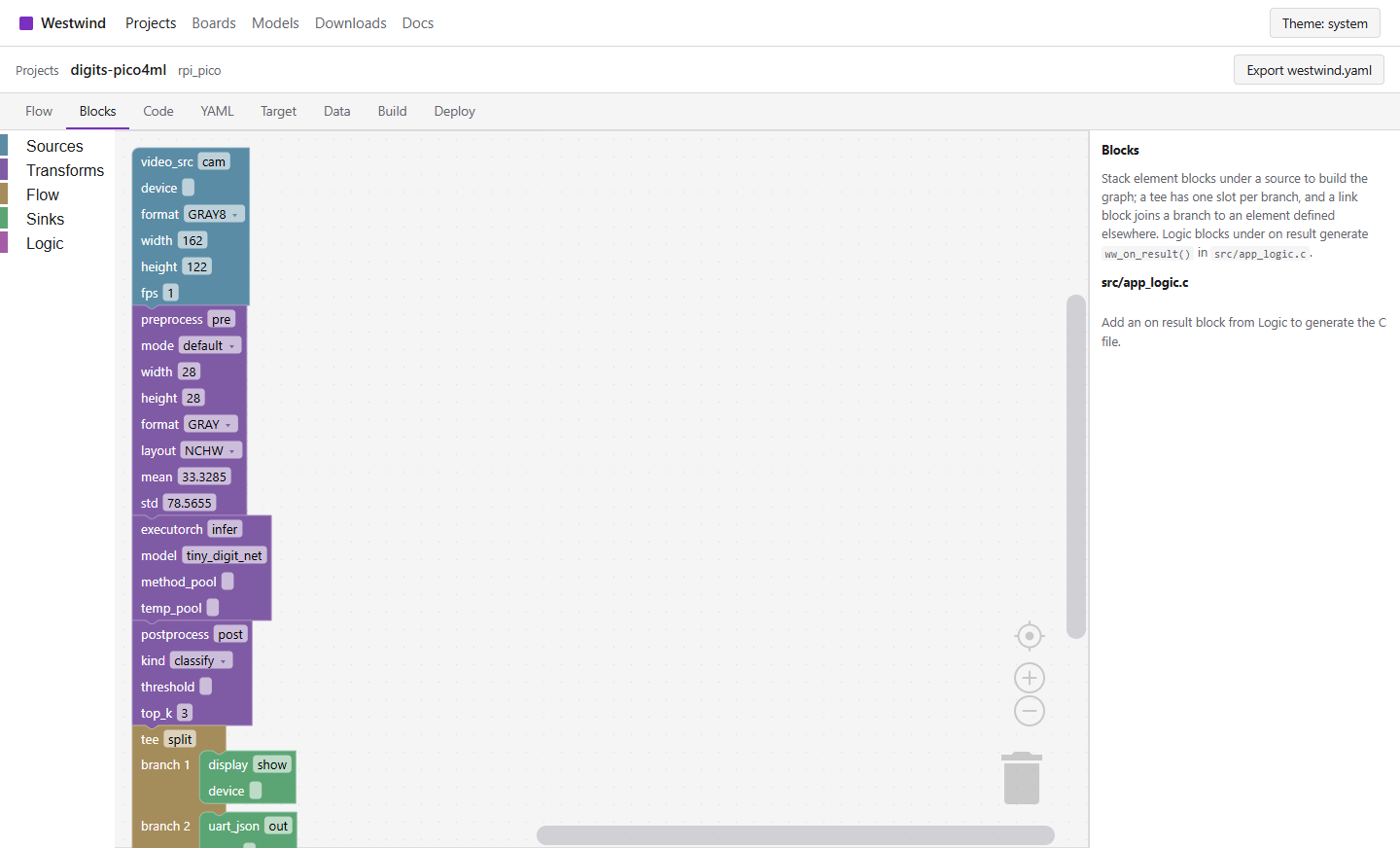
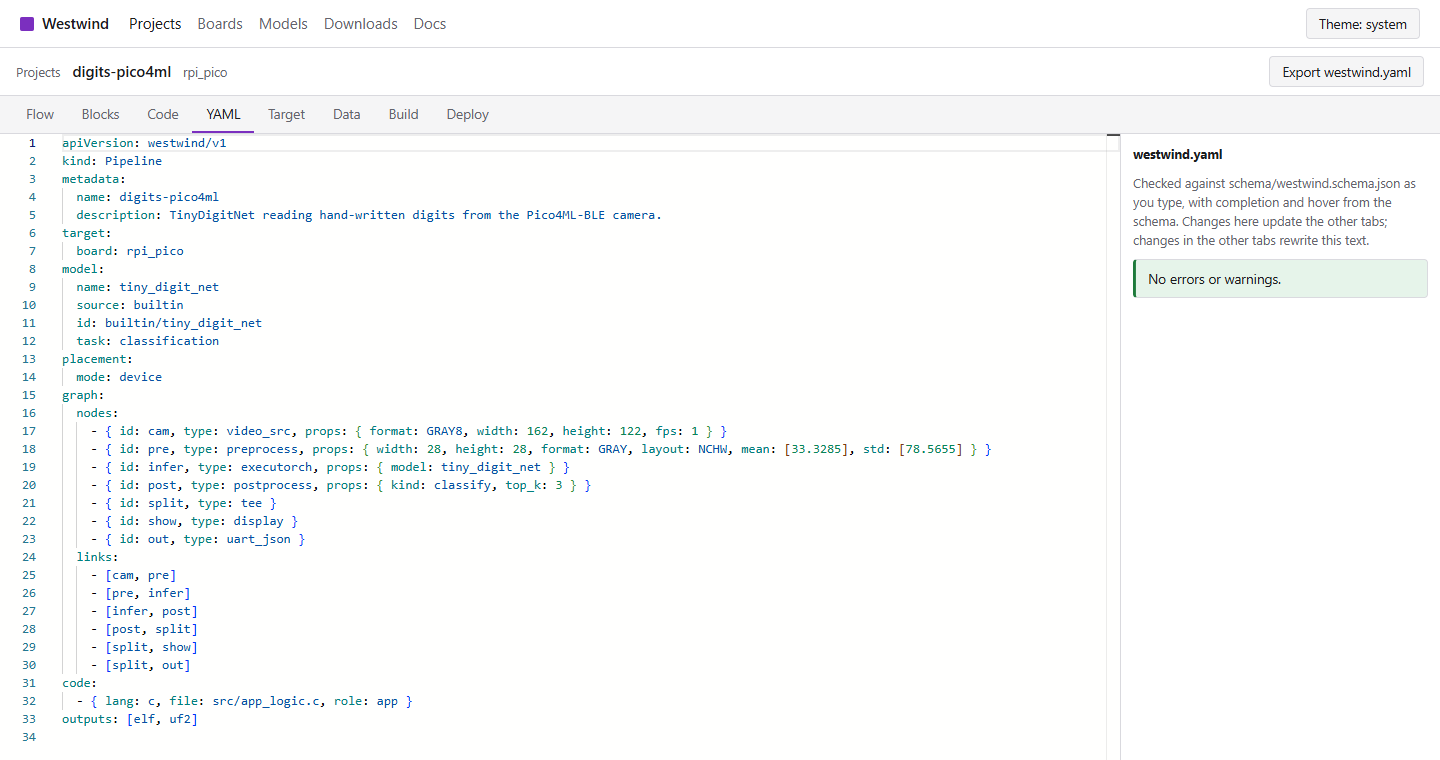
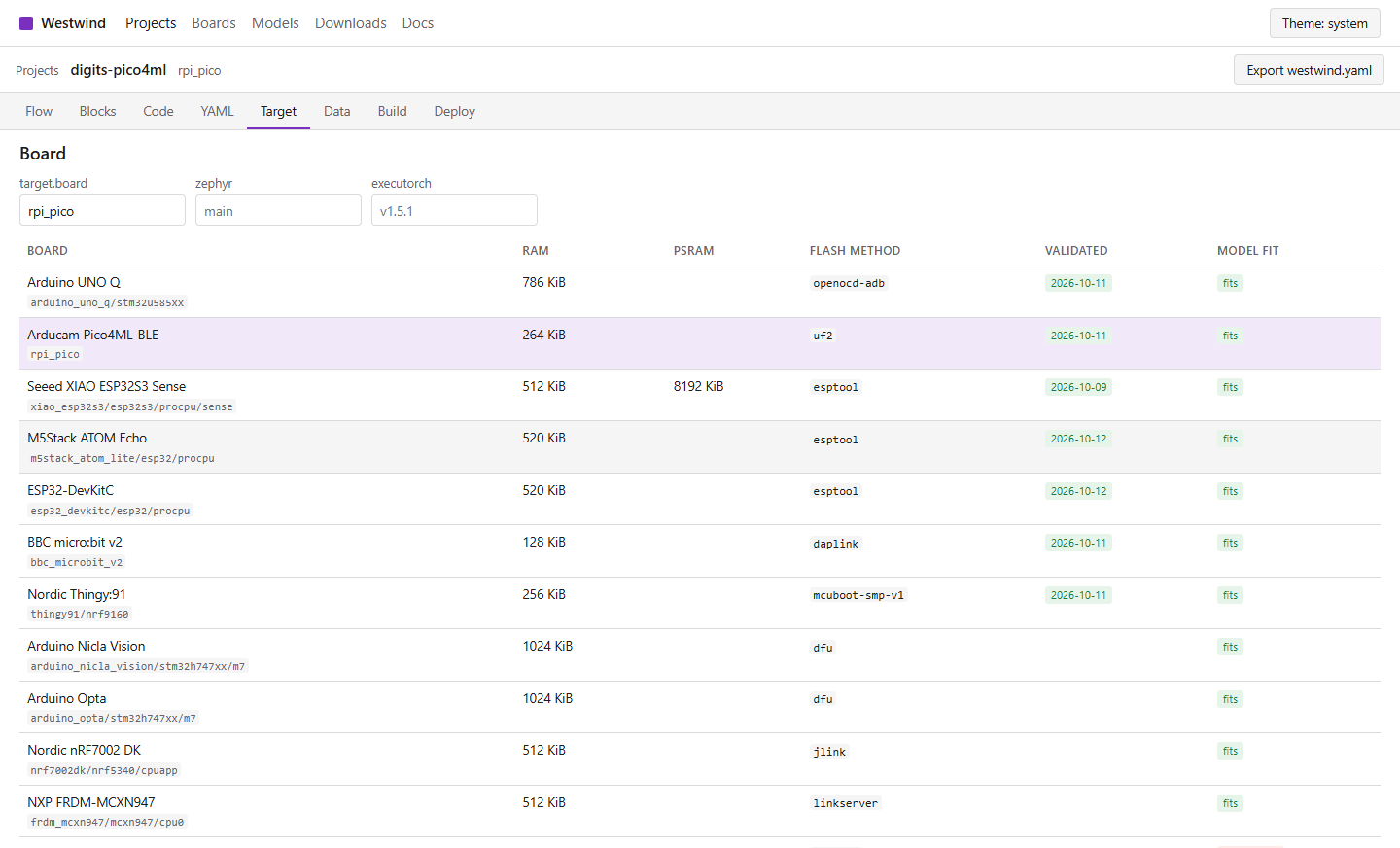
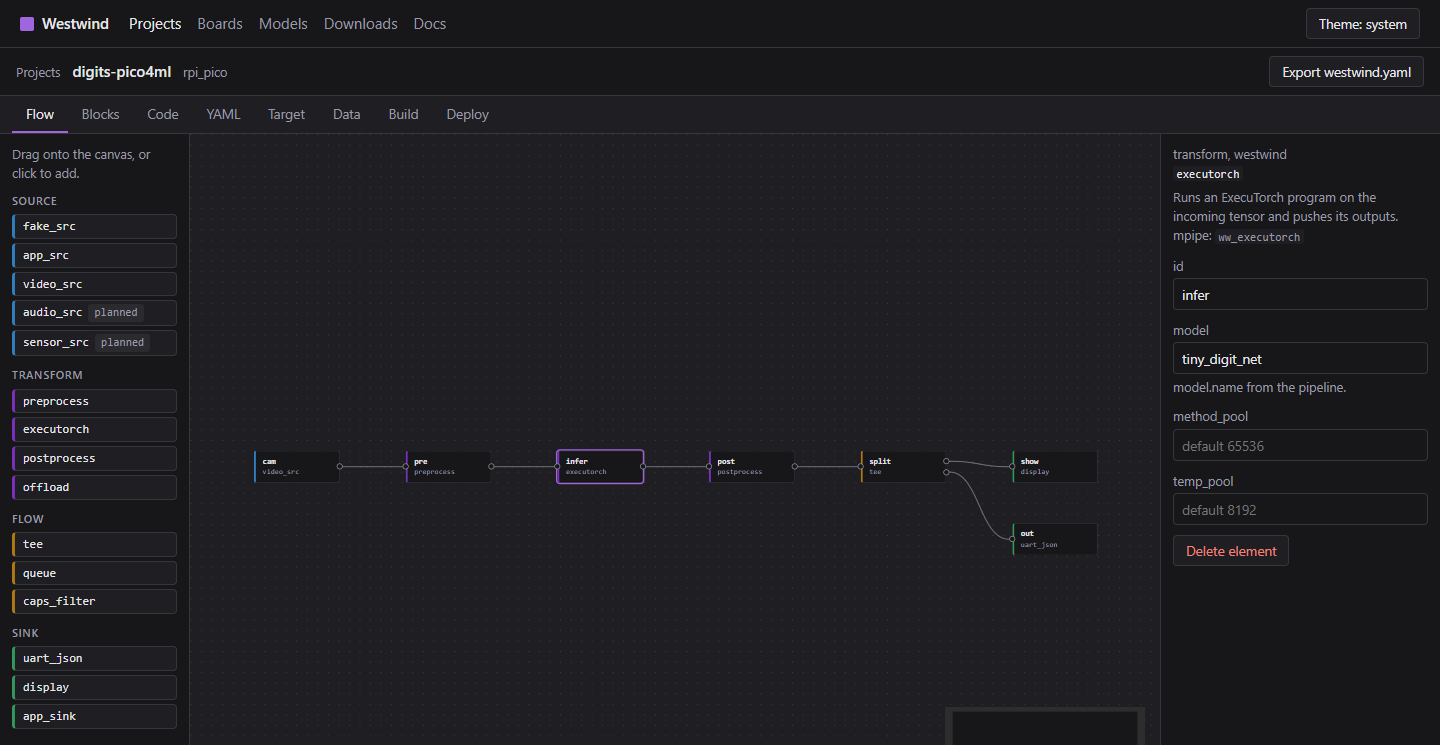
The project editor on this site has eight tabs over the same westwind.yaml. Edits in one tab show up in the others, and the file is checked against the schema and the catalogs as you type. The screenshots below are of this site with the digits example loaded.
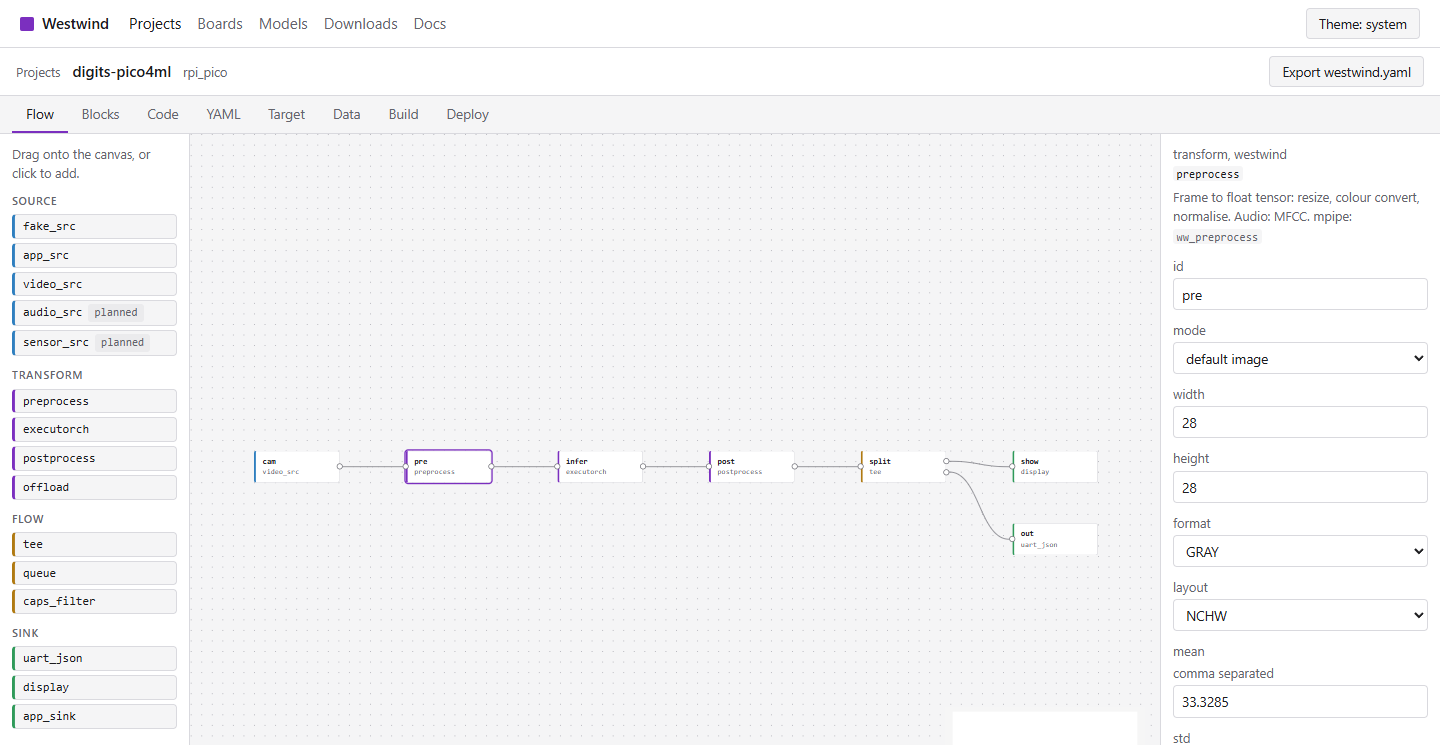
- A flow view of the graph, with the 15 mpipe elements in a palette and a property form for each.
- Blockly blocks for the same graph, plus logic blocks (on result, if label, if anomaly, for each box, set LED, send event) that generate
ww_on_result()in C. - A code editor for
ww_on_result()in C or C++, thetrain.pytraining recipe and thehost.pyhandler forwestwind serve. - The YAML itself, with completion and checks from the schema.
- Board and model choice with a memory fit check, placement and compute settings, dataset and model search, firmware builds in GitHub Actions, and flashing from the browser.
Start from one of the 7 example pipelines, or import a westwind.yaml.
Where the model runs
device- The model runs in the firmware through the ww_executorch element.
edge- The firmware sends frames or tensors to westwind serve on a nearby host: a PC, a Jetson, or the Linux side of an Arduino UNO Q.
cloud- As edge, but westwind serve forwards the request to a hosted endpoint such as a Hugging Face Space.
split- A small model on the device decides which frames are worth sending to the edge or cloud model.
On the host side, westwind serve answers offload requests over HTTP, or over UART and USB CDC as WW1 lines that share the console with log output.
Where the host-side work runs
The firmware always runs on the board. Fetching, training, conversion, firmware builds, westwind serve and the Flower SuperLink run where the compute section says:
local- The westwind CLI on your machine. The default.
compose- Containers from deploy/compose.yaml on one machine, one profile per job.
hybrid- Boards, the serial bridge and Flower SuperNodes with their data stay on site in Compose; training, firmware builds, westwind serve and the SuperLink run on Kubernetes.
kubernetes- Everything on a cluster, for example Amazon EKS, with outputs in S3.
westwind deploy writes the Compose file or the Kubernetes manifests for a pipeline and westwind submit runs stages there. See Running in containers.
Boards
18 boards in the catalog. 8 have been run on hardware with ExecuTorch on Zephyr; the others are expected to work. Details and flash methods are on the boards page.
| Board | Memory | Validated |
|---|---|---|
Arduino UNO Qarduino_uno_q/stm32u585xx | 786 KiB | 2026-10-11 |
Arducam Pico4ML-BLErpi_pico | 264 KiB | 2026-10-11 |
Seeed XIAO ESP32S3 Sensexiao_esp32s3/esp32s3/procpu/sense | 512 KiB + 8 MiB PSRAM | 2026-10-09 |
M5Stack ATOM Echom5stack_atom_lite/esp32/procpu | 520 KiB | 2026-10-12 |
ESP32-DevKitCesp32_devkitc/esp32/procpu | 520 KiB | 2026-10-12 |
BBC micro:bit v2bbc_microbit_v2 | 128 KiB | 2026-10-11 |
Nordic Thingy:91thingy91/nrf9160 | 256 KiB | 2026-10-11 |
Arduino Nicla Visionarduino_nicla_vision/stm32h747xx/m7 | 1 MiB | not yet |
Arduino Optaarduino_opta/stm32h747xx/m7 | 1 MiB | not yet |
Nordic nRF7002 DKnrf7002dk/nrf5340/cpuapp | 512 KiB | not yet |
NXP FRDM-MCXN947frdm_mcxn947/mcxn947/cpu0 | 512 KiB | not yet |
TI LAUNCHXL-CC1352P1cc1352p1_launchxl | 80 KiB | not yet |
Espressif ESP32-S3-EYEesp32s3_eye/esp32s3/procpu | 512 KiB + 8 MiB PSRAM | not yet |
Espressif ESP32-C3-DevKitMesp32c3_devkitm | 400 KiB | not yet |
M5StickC Plusm5stickc_plus/esp32/procpu | 520 KiB | not yet |
Sipeed Tang Nano 20K (LiteX VexRiscv)tang_nano_20k | 8 MiB | 2026-11-10 |
Arm Corstone-300 FVPmps3/corstone300/fvp | 4 MiB | not yet |
Native simulatornative_sim | 64 MiB | not yet |
Models
12 models in the catalog: 8 MediaPipe models for faces, pose, hands, segmentation, audio and objects, 3 small builtin models published on Hugging Face (digits, anomaly detection, keyword spotting), and a Hugging Face Space for cloud segmentation. Each entry says whether it fits a board, needs PSRAM, or belongs on an edge or cloud host. See the models page.
VS Code and OpenCode
The VS Code extension runs the CLI stages from the command palette, including writing deployment files, submitting to Compose or Kubernetes and running federated training. It registers two MCP servers for coding agents: the Westwind server (westwind mcp) for validation, generation, builds and dataset search, and the Zephyr documentation server. westwind editor --opencode writes the same setup for OpenCode. The extension, the CLI install line and the container images are on the downloads page.
Documentation
- Pipeline file: westwind.yaml, its sections and the schema.
- Placement: Device, edge, cloud and split placement, and federated training.
- Compute: Where the host-side work runs: local, compose, hybrid or Kubernetes.
- Running in containers: Images, Docker Compose profiles, Kubernetes on Amazon EKS, hybrid sites and measured results.
- CLI: The westwind command and its stages.
- MCP and editors: The Westwind MCP server, the Zephyr documentation server, OpenCode and VS Code configuration.
- Firmware builds: The GitHub Actions workflow, its inputs and the artifact manifest.
- Offload protocol: HTTP and serial protocol of westwind serve, and result objects.
- C API: ww_result and ww_on_result() for application code on the device.
Account
Sign-in is not configured on this deployment (AUTH_SECRET and provider credentials are not set). Projects, editing and validation work without an account; builds need one.
GitHub accounts build in a repository you choose with your own token (scopes read:user, repo, workflow). Google accounts build in the shared build repository.